deskpresence
Turns the TV off when nobody is at the desk and back on the moment someone is. A 24 GHz mmWave presence sensor (Hi-Link LD2410C) on a USB UART feeds a small Go daemon that owns the TV. Its rule, for an OLED whose life it is guarding, is fail safe: when in doubt, the panel goes off.
TV on  <=>  someone within reach of the sensor
            and the keyboard or mouse touched within the last hour
Bodies do most of the work, so a film keeps playing while you watch it and the screen goes dark seconds after you walk away, even if a download is still running. Under the radar sits conventional input idle, from hypridle with idle inhibitors ignored: an hour without input turns the panel off whatever the radar says, so a radar that misreads an empty room (it did, all night, on 2026-09-26) cannot keep the panel lit. Input also covers for the radar: typing keeps the TV on even if the sensor misses you, and a silent sensor hands the decision to input idle.
The daemon also fades PipeWire audio and pauses MPRIS players on the way out, resumes them on the way back, and serves a live view of the sensor at http://127.0.0.1:7391 for tuning.
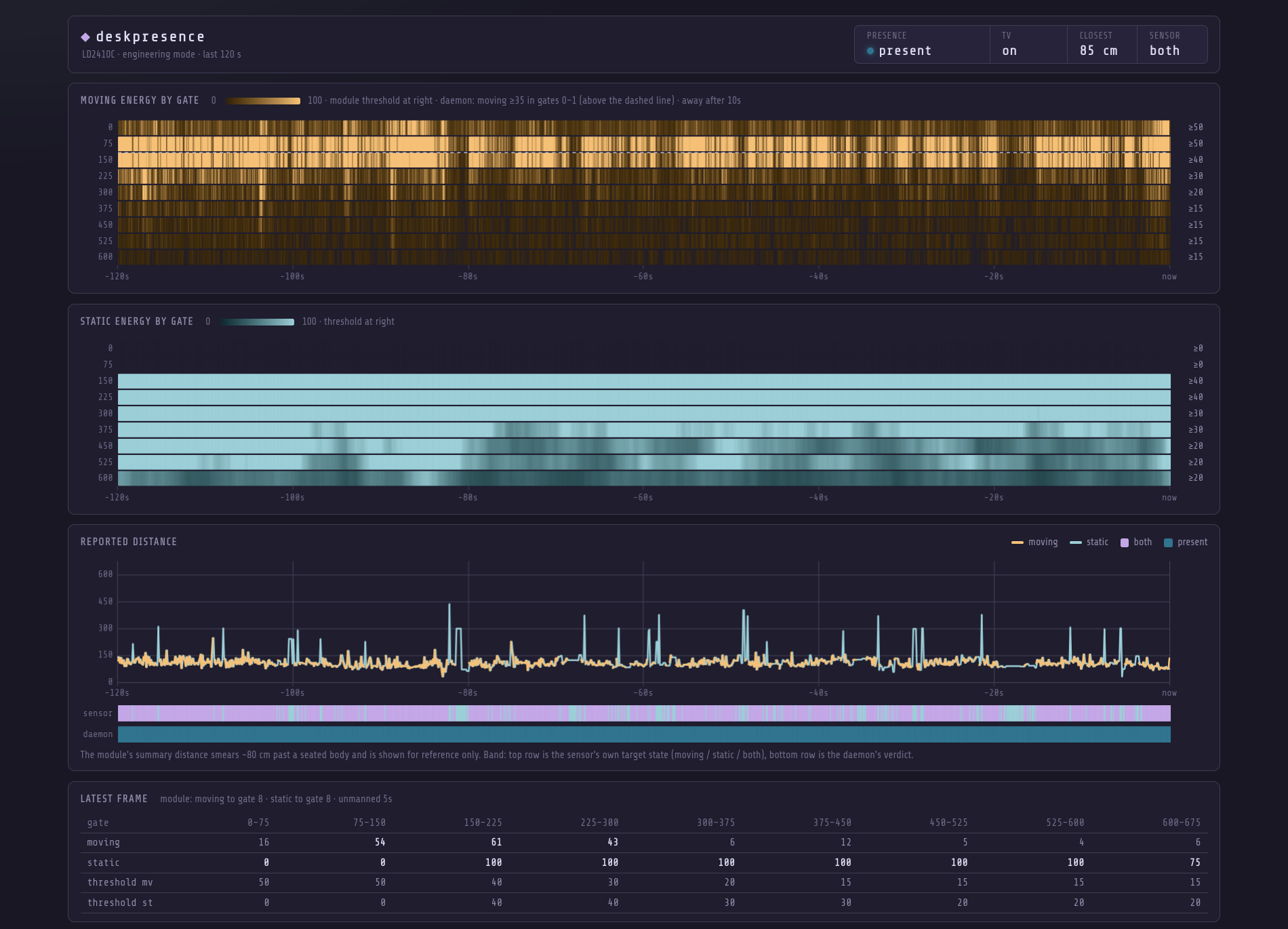
How it works
The LD2410C reports ten times a second. In engineering mode each report carries a moving-energy and a static-energy value (0 to 100) for each of nine range gates, 75 cm apart. The daemon reads only the moving energy of the first few gates, the ones that cover the chair:
- Present when moving energy in any of the first
-near-gatesgates reaches the threshold in-confirm-frames(2) frames within-confirm-window(4 s), held for-debounce(500 ms) before the TV comes on. A single noisy frame neither counts as presence nor restarts the absence clock. - Absent when that has not been true for
-absence(10 to 60 s). - The threshold learns the room. The empty-room noise drifts (a 99.5th
percentile of 27 after the module swap, 41 a week later), so the daemon
keeps six hours of near-gate energy from moments it is sure the room is
empty: its own "away" with the TV off, or an hour without input. The
threshold is that noise's 99.5th percentile plus 4, never under
-energy-minand never over 70, once 3000 frames (five minutes) are held. It is saved in-floor-fileand every change is logged. - Radar out when the sensor has been silent for
-stale(5 s). Input idle decides: on while the keyboard or mouse was used in the last 10 minutes, off after that. It no longer holds the TV in whatever state it was.
The whole decision (Policy.Want):
| input | radar | TV |
|---|---|---|
| away (1 h without input) | anything | off, until input returns |
| active (< 20 s) | anything | on |
| quiet or idle | healthy | the radar's verdict |
| quiet (20 s to 10 min) | out | on |
| idle | out | off |
| unknown (hypridle not running) | healthy | the radar's verdict for at most -input-cap (1 h), then off, with an alert |
| unknown | out | off |
Why not the module's own presence output or its summary distance? The
summary distance smears about 80 cm past a seated body, the static channel
is blind inside 150 cm and saturated by the room beyond it, and the module's
built-in verdict flickers. Per-gate moving energy at the chair is the one
signal that separates a person sitting still from an empty room. Basic
frames (no gate data) fall back to "target within -max-distance".
The actuator is any script that takes on or off. The daemon compares the
desk state with the TV state file every 250 ms and acts whenever they
disagree, with a 30 s to 10 min backoff for a failing actuator. It is
level-triggered: if something else turns the TV off while you are reading,
it comes back on within a few seconds. The actuator's exit code says how it
went (0 done, 1 failed, 2 abandoned because the decision changed, 3 TV
unreachable, state unknown); the state file stays the record.
Around the edges:
-fade(5 s) dims the screen and PipeWire streams before absence latches, so the cut is not a surprise. Streams listed in-audio-excludeare left alone. Volumes are remembered by application and restored on return.-blackout(off by default; the unit uses 10 min) keeps the TV on behind the faded-out black screen for that long after the desk empties, and only then powers it off. A black OLED is dark pixels, so this costs almost nothing, and a return inside the window is instant. It exists because this LG falls into a deeper standby after a few minutes off, and a wake from there is a 17 to 30 s boot (2026-10-03: 21 of 21 wakes after 15+ min off were slow, 0 of 99 under 2 min). Only the radar's own away waits: an hour without input or a dead sensor still turns the TV off at once. The hooks follow the decision, not the TV, so the light still goes off when you leave.- MPRIS players are paused on leave and resumed on return (
-no-mpristo disable). - A logind delay inhibitor turns the TV off before suspend. After resume the policy resets and the sensor decides again.
- A dead sensor is the dangerous case on an OLED, because nothing blanks it.
After
-alert-after(2 min) of silence the daemon speaks and posts a critical notification, then repeats hourly. A sensor that has never been seen since start does not alert, so the unit can sit enabled before the hardware is plugged in.
Parts
| Part | Notes |
|---|---|
| Hi-Link LD2410C | 24 GHz mmWave, 5 V, UART at 256000 baud. The C variant has the 1.27 mm 5-pin header. |
| CP2102 USB to UART bridge | Needs a 5 V pin, not just 3.3 V. Any CP210x board works; the default -port glob matches it. |
| Four short leads | Enamelled speaker wire works and doubles as the mount. |
| Heat-shrink | For the two leads that cross. See assembly. |
| Optional 1.27 mm header | If you would rather not solder leads to the module. |
The module has no reverse-polarity protection. Check VCC and GND twice.
Assembly
Solder to the module. The 5-pin edge is VCC, GND, OUT, RX, TX. OUT is the module's own presence pin and is not used. Solder either a header or four leads directly to VCC, GND, RX and TX.
Cross the data lines. UART is crossed: the bridge's transmit goes to the module's receive.
 CP2102 5V  -> LD2410C VCC
 CP2102 GND -> LD2410C GND
 CP2102 TXD -> LD2410C RX
 CP2102 RXD -> LD2410C TX
Insulate the crossing. With enamelled wire, RX and TX cross each other with nothing but enamel between them. Slip heat-shrink over each of those two leads before you bend anything into place. A bare crossing works until the enamel wears through, then the port goes silent for no visible reason.
Power from 5 V. The module regulates its own 3.3 V. Feeding it 3.3 V directly gives erratic frames or none.
Mount and aim. Stiff wire is enough to hold the module; a housing is not needed. The antenna patches (the flat side without components) face the chair, roughly at seat height and within 150 cm of it. Do not point it down a hallway or at a door.
Plug in. The bridge appears as
/dev/serial/by-id/usb-Silicon_Labs_CP2102_USB_to_UART_Bridge_Controller_*. On Arch, add yourself touucpif you get permission denied:sudo usermod -aG uucp $USER
First run
go install .
deskpresence -verbose            # print every frame
deskpresence config show         # module parameters (daemon must be stopped)
Open http://127.0.0.1:7391 for the live view: two heatmaps (moving and static energy by gate over the last 120 s), the reported distance, and a band showing the sensor's own state against the daemon's verdict. The dashed line on the moving heatmap is the daemon's near-gate boundary. Hover anywhere for that frame's numbers, with the gate under the pointer highlighted:
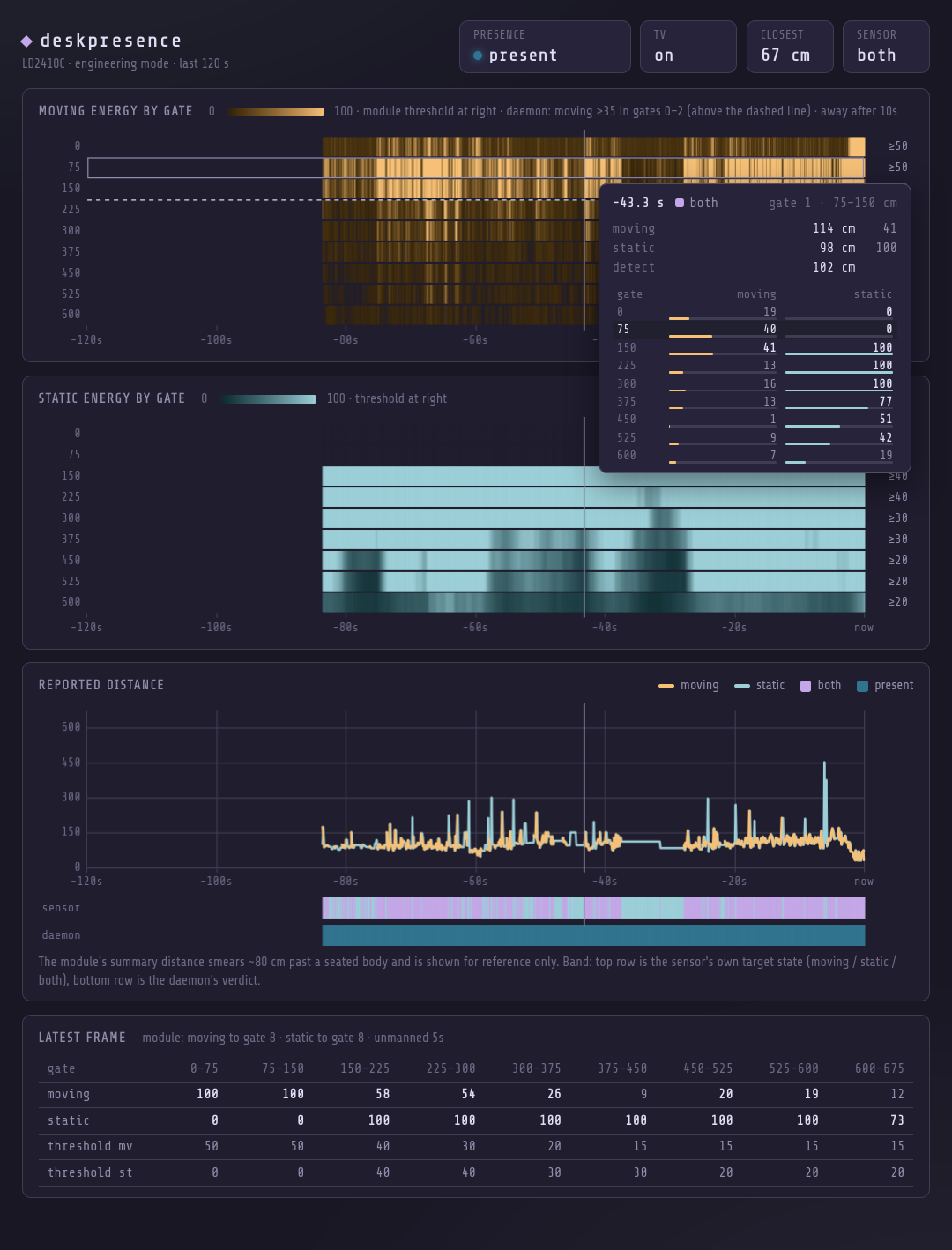
The module ships in basic mode. deskpresence switches it to engineering
mode on connect, so the gate data appears within a second.
Calibration
Thresholds depend on the chair, the distance and the room, so measure rather than guess. With the live view open:
- Sit still for a minute. Read the highest moving energy in the near gates (the rows above the dashed line). Breathing and small movements keep it well above zero.
- Walk out of the room for 30 s. Read the highest value the same rows reach with nobody there.
- Pick
-energy-minbetween the two, closer to the empty-room number. It is the floor under the learned threshold, which will rise above it if the room is noisier. - Pick
-absencefor the longest gap a still reader leaves between frames above the threshold, times two. A seated person's moving energy spikes every few seconds, but a four-minute recording of reading with hands off the desk showed one gap of 10 s, so 10 s is not enough.-fadestarts dimming before absence latches; one breath cancels it.
Measured at this desk, module about 1 m from the chair:
| Gates 0 and 1 (0 to 150 cm) | Gate 2 (150 to 225 cm) | |
|---|---|---|
| Typing | peaks 100 every few seconds, mean 55 to 73 | 50 to 100 |
| Reading, hands off | peaks 33 to 53 every 5 s, longest gap above 38 was 10 s | |
| Room empty | mostly under 30, single frames of 32 to 38 | blips of 35 to 86 |
Which gave -near-gates 2 -energy-min 38 -absence 20s -fade 8s. By
2026-09-27 the empty room reached 41 at the 99.5th percentile and threw a
frame over 38 every 10 to 20 s, so the verdict never went away. A
10-minute empty recording and a 15-minute still one gave the current rule:
| rule | empty room: presence refreshes in 575 s | seated: longest gap |
|---|---|---|
| any frame at 38 | 57 | 10 s |
| two frames at 45 within 4 s | 8, the longest quiet stretch 293 s | 17.6 s |
Hence the unit file's -energy-min 40 -absence 30s -fade 8s, with the
learned threshold (45 from that recording) on top. An away timer longer
than a minute would rarely expire in an empty room, so the daemon clamps it
at 60 s; long still stretches are what hold and input activity are for.
Static energy does not help here: the module reports none for gates 0 and
1, and gates 2 and 3 read 100 with the room empty.
The third gate was in the rule at first; it turned out to carry energy from
beyond the desk (a body in the next room reads through drywall), and one
walk-away test kept the TV on for a full minute because of it. Keep the
near gates to where the chair actually is and let the empty-room maximum
set the threshold.
If a gate beyond the chair picks up the room (a fan, a corridor), lower its sensitivity in the module rather than widening the daemon's rule:
deskpresence config sens <gate|all> <movingSens> <staticSens>
deskpresence config gates <maxMovingGate> <maxStaticGate> <unmannedSeconds>
deskpresence config factory
A sensitivity of 100 disables a gate. Settings persist in the module.
Run as a service
install -Dm644 systemd/deskpresence.service -t ~/.config/systemd/user/
systemctl --user enable --now deskpresence
On the laptop (the ToF sensor) install its unit under the same name:
install -Dm644 systemd/deskpresence-tof.service ~/.config/systemd/user/deskpresence.serviceEdit the ExecStart flags in the unit to your calibrated values. While
tuning:
touch $XDG_RUNTIME_DIR/deskpresence.pause    # observe only, never act
deskpresence hold 30m                        # same, but expires itself (`hold off` releases)
deskpresence absence 45s                     # away timer, live, 10-60 s; `absence off` returns to -absence
deskpresence input active                    # what hypridle's listeners run: active|quiet|idle|away
echo off > ~/.local/state/deskpresence/audio-follow   # leave players and volumes alone
deskpresence -dry-run -replay present:5s,absent:70s,present:3s -absence 60s
cat ~/.local/state/deskpresence/status.json
journalctl --user -u deskpresence -f
status.json is rewritten on every change and is what a bar or chip reads:
rule       near_gates, energy_min (the live threshold), absence_ms,
           max_distance, confirm_frames, confirm_window_ms,
           floor_learned, floor_frames
present    the daemon's verdict
known      false until the first frame
since      ms timestamp of the last verdict change
fade       0 to 1, how far into the pre-absence dim
sensor_ok  false when frames have stopped
tv         on, off, or "" when the state file is missing
busy       actuator running
paused     pause file present
state      the sensor's own target state (0 none, 1 moving, 2 static, 3 both)
distance   the sensor's summary distance in cm
history.json beside it holds the last 60 s at 2 Hz: near[] (max
near-gate moving energy per bin), present[], threshold and bin_ms.
Flags
| Flag | Default | Purpose |
|---|---|---|
-port |
/dev/serial/by-id/*CP210* |
serial device, glob allowed |
-baud |
256000 |
the module default |
-near-gates |
3 |
gates (75 cm each) that count as the desk; 0 uses -max-distance |
-energy-min |
40 |
the lowest the learned threshold may go (moving energy in a near gate) |
-confirm-frames |
2 |
frames at or over the threshold within -confirm-window that count as presence; 1 = any frame |
-confirm-window |
4s |
see -confirm-frames |
-floor-file |
~/.local/state/deskpresence/floor.json |
learned empty-room noise, six hours of 10-minute histograms |
-max-distance |
250 |
basic frames only: ignore targets farther than this (cm) |
-debounce |
500ms |
presence must hold this long before the TV comes on |
-absence |
60s |
desk must be empty this long before the TV goes off |
-stale |
5s |
no frames for this long means the radar is out and input idle decides |
-input-file |
$XDG_RUNTIME_DIR/deskpresence.input |
input level hypridle writes (deskpresence input active|quiet|idle|away) |
-input-cap |
1h |
with no input signal (hypridle down), the radar alone keeps the TV on at most this long |
-fade |
5s |
start dimming this long before absence latches; 0 disables |
-blackout |
0 |
after the desk empties, keep the TV on behind a black screen this long before powering it off; 0 = off at once |
-alert-after |
2m |
sensor silent this long triggers the spoken and desktop alert |
-script |
~/.config/hypr/scripts/tv-screen.sh |
actuator, called with on or off |
-hooks |
none | commands run when the decision turns on or off (arrive and leave, even while -blackout holds the TV), comma separated; {} becomes on or off, otherwise the verb is appended |
-state |
~/.config/lgtv/state |
TV state file the actuator writes |
-status |
~/.local/state/deskpresence/status.json |
status output |
-pause-file |
$XDG_RUNTIME_DIR/deskpresence.pause |
while present, observe but never act, except that an hour without input still turns the TV off |
-hold-file |
$XDG_RUNTIME_DIR/deskpresence.hold |
unix seconds; observe only until then, then removed (deskpresence hold 30m); the one thing that beats an hour without input |
-absence-file |
~/.local/state/deskpresence/absence |
overrides -absence while the daemon runs, seconds or a duration, 10 to 60 s (deskpresence absence 45s) |
-audio-flag |
~/.local/state/deskpresence/audio-follow |
reads off to leave players and volumes alone |
-http |
127.0.0.1:7391 |
live view address; empty disables |
-no-audio-fade |
leave PipeWire streams alone | |
-audio-exclude |
emotune,speech-dispatcher |
application names never faded |
-no-mpris |
do not pause or resume players | |
-dry-run |
log actions instead of running the actuator | |
-replay |
synthesise frames, e.g. present:5s,absent:70s |
|
-verbose |
log every frame |
Integrations
Anything that should follow the desk can ride on -hooks. This unit turns
the office light with the TV through a local Kasa switch:
-hooks "python %h/Projects/Python/kasactl/kasactl.py {} 192.168.11.97"Hooks run in parallel with the actuator and each other, are bounded to 30 s, and are never retried: presence is the truth, the log says what failed.
Actuator. Any executable taking on or off. It should serialise on its
own lock and write the state it achieved (on or off) to the -state
file, because the daemon trusts that file rather than remembering what it
asked for. The bundled default is an LG webOS script that talks to the TV
over its API, which avoids DPMS entirely (an NVIDIA FRL link that loses a
modeset race stays at 60 Hz until reboot).
Bars and chips. Read status.json. It changes only when something
changed, so polling it once a second is cheap.
Input idle (hypridle)
hypridle reports input idle through deskpresence input <level>, which
writes $XDG_RUNTIME_DIR/deskpresence.input. Its listeners must ignore
idle inhibitors (per listener, ignore_inhibit = true, plus the general
ignore_*_inhibit options): an app holding one all night is exactly what
left the panel lit. A film longer than an hour takes deskpresence hold 3h.
Keep the quiet listener under the away timer (20 s against 30 s). Input that counts as active keeps the TV on whatever the radar says, and no dim is shown then, so a 60 s quiet made the real away timer a minute; the screen dimmed at 30 s and then sat there.
general { ignore_dbus_inhibit = true; ignore_systemd_inhibit = true; ignore_wayland_inhibit = true }
listener { timeout = 20;   ignore_inhibit = true; on-timeout = deskpresence input quiet; on-resume = deskpresence input active }
listener { timeout = 600;  ignore_inhibit = true; on-timeout = deskpresence input idle;  on-resume = deskpresence input active }
listener { timeout = 3600; ignore_inhibit = true; on-timeout = deskpresence input away;  on-resume = deskpresence input active }
A level counts only while a process named hypridle is running, so a stale
"active" from a crashed hypridle cannot keep the panel lit. Run it as a
service that writes active on start and always restarts (an
ExecStartPre=deskpresence input active drop-in, Restart=always).
Nothing else should turn the TV on or off, or it will fight this daemon. A watchdog on hypridle's 10-minute listener that blanks the TV only when this daemon is dead (its status file is older than 15 s) is the one exception worth having.
Licence
MIT.