hyprglaze
A wallpaper daemon for Hyprland that renders GLSL shaders and modular effects on the background layer. The wallpaper knows what is happening above it: window geometry, focus, cursor position, and system audio all feed the shaders in real time.
Features
- Renders behind all windows via wlr-layer-shell, on a chosen monitor or one instance per monitor
- Draws at the monitor's native resolution on scaled displays, via fractional-scale and viewporter
- Shadertoy-compatible GLSL uniforms (iResolution, iTime, iMouse, iWindow)
- Passes every visible window to shaders with identity-based focus, tracking each one through Hyprland's own move and resize animation (the curve is detected and replayed, since Hyprland only reports where a window is going) and following interactive drags exactly
- Receives compositor state as push events from a small Lua watcher installed inside Hyprland, so geometry stays live even mid-drag; the cursor is asked for directly each frame, so it is never more than one input event behind
- Captures system audio through PipeWire/PulseAudio, auto-detecting the output monitor
- Ships 365 Gogh terminal color schemes as palette uniforms; sprites recolor to match the theme
- Loads pluggable effects, each with its own TOML config section
- Reloads config live via inotify, including switching effects on the fly
- Eases focus transitions independently of frame rate; cursor and geometry smoothing are optional extras
- Runs real simulations where an effect calls for one: substepped XPBD ball physics with windows as moving colliders, 2D laser ray tracing, space-limited plant growth
- Includes an animated desktop buddy, optionally driven by Claude Haiku on AWS Bedrock
Effects
| Effect | Description |
|---|---|
particles |
Balls in a substepped XPBD physics sim: they fall toward the focused window and settle against its frame, moving windows bat them, hard hits pop |
windowglow |
Subtle accent glow around focused window, surface tint on unfocused |
cellbloom |
Living Voronoi tissue around windows and cursor: rounded cells with glowing membranes that divide and fuse, lit by the music |
concentric |
SDF concentric rings radiating from window edges, cursor interaction |
fluid |
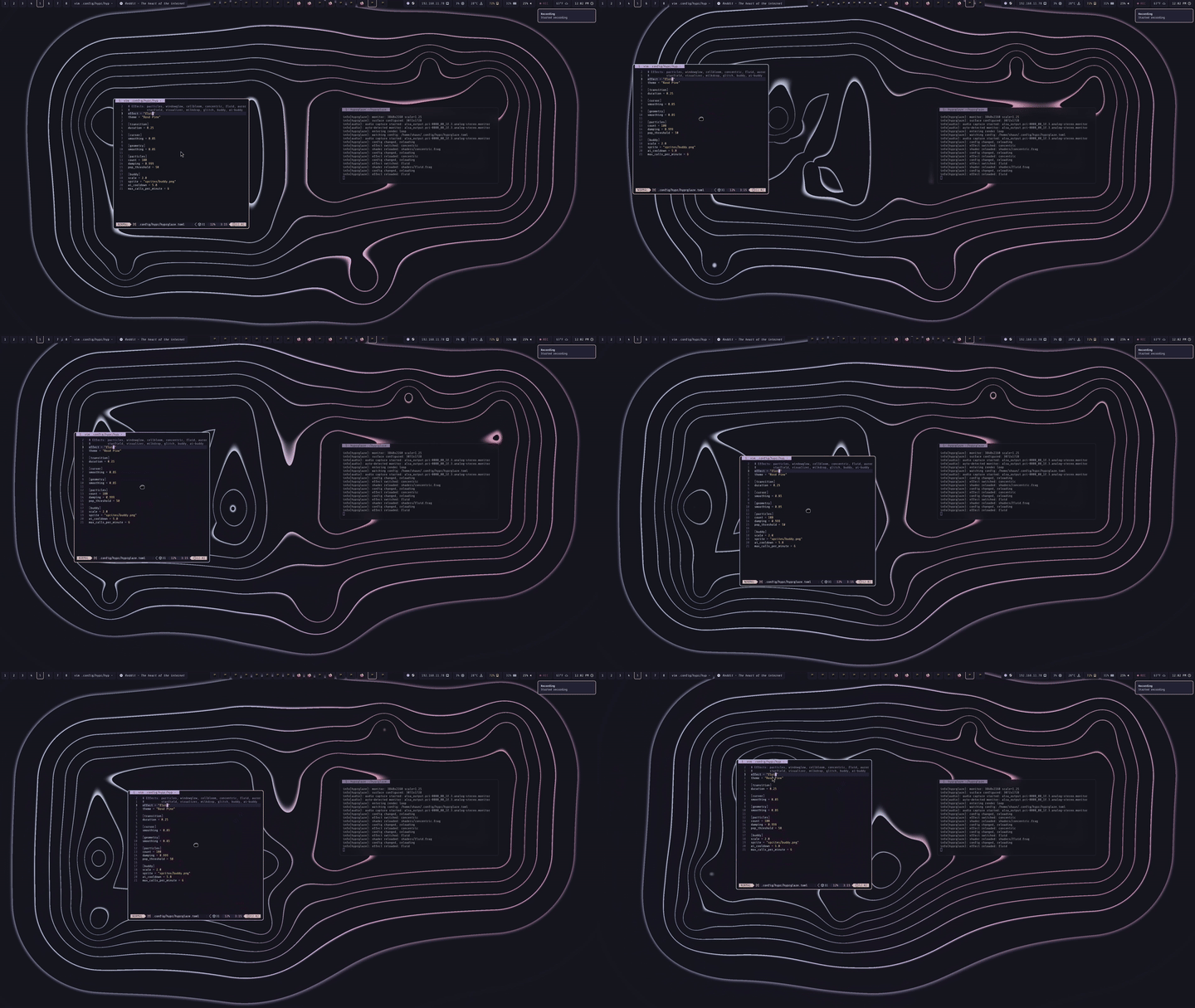
Metaball contour lines that merge organically around windows and cursor |
starfield |
Flight through a 3D starfield: the cursor steers and the camera banks into turns, stars streak past with diffraction spikes on the bright ones, through a palette nebula that zooms by forever. Music pushes the speed, kicks surge it, and now and then it jumps to hyperspace |
visualizer |
Stereo waveform with Catmull-Rom interpolation, amplitude-driven palette colors |
milkdrop |
MilkDrop-style visualizer: eleven presets of per-frame motion equations (zoom, rotation, warp, ripple, kaleidoscope) over a half-float feedback loop, with scope/circle/spectrum/spiral waveforms, custom shapes, borders and video echo, blending into each other through patterned transitions. One preset draws your windows into the loop. Dreams on a synthetic wave when no music plays |
buddy |
Animated sprite character with procedural behaviors, palette-recolored |
ai-buddy |
AI-driven buddy with mood system, emote particles, window awareness, wall climbing |
glitch |
Circuit-bent video feedback: a camera filming its own monitor, with your window frames as the only light. Stutter, freezes, skipping and slit-scan playback, sync loss, mosaic, crude dither, all in the theme's surface tones with brief accent bursts; music speeds the bends up |
tide |
Rising water line tied to wall-clock time, with teardrops and splash jets |
fire |
Flames rise from window top edges; moving windows leave a directional wake |
voltaic |
Lightning arcs between window borders, St. Elmo's fire on the focused frame, beat-driven discharges |
moire |
Fine ring gratings radiating from invisible bodies orbiting windows; where they cross, moiré fringes. Gravitationally lensed, audio-reactive |
swarm |
Boid murmuration in pixel-block ink; a hawk dives on beats, silence settles the birds onto windows |
ivy |
Bioluminescent vines climb window frames and screen edges until the frame is clad, then mature in place; they wilt when their window moves or closes and wait dormant while it is on another workspace |
weft |
Windows shine through a grainy diffraction weave; the audio waveform threads through the fringes |
whorl |
Cyclic cellular automaton on a phosphor CRT: two-tone spiral waves break around windows, music wired into the rules |
fur |
A short combed pile: the cursor parts it, windows crush it flat and heap a ridge at their edges, bass shivers the coat |
amorphous |
Flat liquid blobs in two layers, colors rolled from the theme; they drift, meet gentle resistance at windows, wrap across the screen, loosen and ripple with music, and the cursor is a lamp on their edges |
laser |
Lasers fired from opposite screen corners toward the cursor in two theme colours, reflecting off windows and the screen's edges and dimming with every bounce, through smoke they light up; one resonates with the lows, the other with the highs |
flux |
Magnetic field lines: every window is a bar magnet, the cursor a compass needle; pulses flow north to south with the music |
crystal |
A ray-traced cluster of quartz shards with real refraction and dispersion; your windows are the lights, and the focused one is the key light |
Requirements
hyprglaze talks to Hyprland through its Lua config manager, which means Hyprland 0.55 or newer configured with hyprland.lua rather than the classic hyprland.conf. At startup the daemon installs a watcher into the compositor's Lua state; if your Hyprland runs a classic config, hyprglaze will refuse to start.
Developed and tested against 0.56.2. The watcher reads the monitor list through hl.get_monitors(); where that is unavailable it degrades to emitting only a heartbeat, which leaves the wallpaper running but tracking nothing, so prefer a recent Hyprland.
Install (Arch Linux)
From AUR
yay -S hyprglaze-gitFrom source
sudo pacman -S zig wayland mesa libglvnd stb libpulse
zig build
zig build run
To install system-wide (binary, shaders, sprite sheet and the systemd user units, the same layout as the package):
sudo zig build -Doptimize=ReleaseSafe --prefix /usrConfiguration
~/.config/hypr/hyprglaze.toml:
# Effects: particles, windowglow, cellbloom, concentric, fluid, starfield,
#          visualizer, milkdrop, glitch, buddy, ai-buddy, tide, fire, swarm,
#          voltaic, moire, ivy, whorl, weft, crystal, fur, amorphous, laser,
#          flux
effect = "fluid"
theme = "Rosé Pine"
# output = "DP-1"     # monitor to render on; default is the focused one
# output_wait = 60    # seconds to wait for a removed output to come back before
#                     # exiting non-zero; 0 = forever (the default when unpinned)

[laser]
# corner  = "bottom-left"  # first emitter: bottom-left, bottom-right, top-left, top-right
# beams   = 2              # 2 adds a second beam from the opposite corner
# falloff = 0.82           # intensity kept at each bounce
# width   = 1.6            # beam core radius in px
# color   = 2              # first beam's theme slot (1-16, the color_NN numbers)
# color2  = 5              # second beam's theme slot
# smoke   = 0.6            # drifting smoke the beams light up; 0 = none
# speckle = 0.6            # laser speckle on scattered light; 0 = none
# music   = true           # the first beam resonates with the lows, the second
#                          # with the highs; bass kicks fire pulses down the first
# react   = 1.0            # strength of the music response
# sink    = "..."          # PulseAudio monitor source (auto-detected by default)

[amorphous]
# size     = 1.0        # blob radius multiplier
# speed    = 1.0        # wobble and drift rate multiplier
# opacity  = 0.55       # front layer over back: 1.0 is opaque, 0 fully tinted
# music    = true       # loudness loosens surface tension; each lobe rides a band
# sink     = "..."      # PulseAudio monitor source (auto-detected by default)
# front    = 2          # fixed layer colors: a theme slot (1-16, the color_NN numbers
# back     = "#C4A7E7"  # in themes.json) or a hex string; omit either to roll it

[fur]
# spacing = 23.0      # follicle spacing in px; finer shimmers and reads as noise
# length  = 30.0      # hair length in px (up to 200); longer hair lies further over
# brightness = 1.0
# music   = true      # bass shivers the coat

[crystal]
# dispersion = 1.0    # prismatic colour split through the shards
# brightness = 1.0    # overall level
# music   = true      # energy turns the light sweep; beats ripple across the faces

# cellbloom and fluid read only `music` (default true) and `sink`.

[windowglow]
# grain   = 0.5       # film grain amplitude, 0-2; 0 disables
# music   = true      # bass and energy swell the glow, treble quickens the grain

[weft]
# scale   = 26.0      # base stripe wavelength in px (8-120)
# reach   = 1.0       # window halo radius multiplier (0.3-3)
# grain   = 1.0       # grain amplitude, 0-2
# music   = true      # the audio waveform threads through the fringes

[whorl]
# Cyclic cellular automaton: N states in a ring, a cell advances when enough
# neighbours already hold the next state; it self-organises into spirals.
# cell_px   = 10.0    # grid cell size in px (4-64)
# states    = 16      # states in the ring (3-32)
# threshold = 3       # neighbours needed to advance (1-12)
# range     = 2       # neighbourhood radius (1-3); range 2 + threshold 3 sustains spirals
# sim_hz    = 14.0    # automaton ticks per second (1-60)
# trail     = 2.5     # phosphor trail behind a wavefront, in ticks (1-20)
# warmup    = 140     # ticks run before the first frame, so it starts organised
# stir      = false   # the cursor injects a cycling state, seeding new spirals
# stir_radius = 2.2   # stir brush radius in cells
# wall_inset  = 2.0   # px inset before window edges become walls
# accent    = 1       # phosphor colours: theme slots (-1 = foreground); waves
# accent2   = 2       #   from the two halves of the ring trade between them
# music     = true    # each band gates its part of the ring; kicks surge it
# kick_threshold = 1.0  # kick detector strictness; higher = fewer kicks
# misconverge = 1.5   # CRT filter: RGB misconvergence in px
# halation  = 0.6     # CRT filter: glow bleeding around bright fronts
# vignette  = 0.22    # CRT filter: edge darkening
# scanbar   = 0.05    # CRT filter: rolling scan bar strength

[transition]
duration = 0.25
# fade_in = 1.0                 # seconds to fade in from the theme background on
#                               # launch and when the surface is rebuilt; 0 disables

# Workspace switches slide the effect field, mirroring Hyprland's own
# workspace animation (direction, duration, and easing are detected from
# `hyprctl animations` at startup and on config reload). Overrides:
# workspace_slide = "auto"      # auto | horizontal | vertical | none
# workspace_duration = 0.0      # seconds; 0 = auto (bezier easing only)
# workspace_spring = ""         # "mass,stiffness,dampening" (Hyprland does
#                               # not expose spring parameters over IPC, so a
#                               # custom hl.curve spring must be mirrored here)

# Window moves and resizes replay Hyprland's own `windowsMove` animation
# (Hyprland reports only where a window is going, so the curve is detected
# and mirrored), and interactive drags are followed exactly. A spring curve
# needs its parameters mirrored, as for workspaces:
# window_spring = ""            # "mass,stiffness,dampening"

[cursor]
smoothing = 0.0       # extra lag on the cursor; 0 = none (it is sampled every frame)

[geometry]
smoothing = 0.0       # extra lag on top of the mirrored animation; 0 = none

[particles]
count = 60            # balls (max 150)
damping = 0.999       # per-1/30s velocity retention (air drag)
pop_threshold = 50    # ball-ball impact speed that bursts a ball, px per 1/30s

[buddy]
scale = 2.0
sprite = "sprites/buddy.png"
ai_cooldown = 5.0
max_calls_per_minute = 6

[tide]
start_hour = 6.0      # hour at which the tide is empty
end_hour   = 24.0     # hour at which the tide is full

[voltaic]
arc_rate = 1.0        # ambient strike frequency multiplier
# music = true        # beats drive discharges; false = no capture, ambient arcs only
# sink = "..."        # PulseAudio monitor source (auto-detected by default)

[moire]
count = 60            # wave sources / orbiting bodies (max 60)
fuzz = true           # ring-grating moire field; false = comet dots + trails
wavelength = 100.0    # px between wave crests
grating = 4           # thin rings drawn per wavelength (1-12); more = finer moire
# music = true        # bands swell the bodies, kicks pulse the field
# sink = "..."        # PulseAudio monitor source (auto-detected by default)

[flux]
lines = 36            # field lines leaving each pole (4-64)
compass = true        # the cursor is a compass needle that follows the field
music = true          # pulses quicken and flash with the music
# sink = "..."        # PulseAudio monitor source (auto-detected by default)

[glitch]
lines = 720           # feedback loop's video resolution in lines (120-2160); fewer = chunkier
# music = true        # music speeds the bends up and kicks throw extra ones in
# sink = "..."        # PulseAudio monitor source (auto-detected by default)

[ivy]
growth = 1.0          # plant pace multiplier (growth and leaf lifetimes)
brightness = 1.0      # foliage glow multiplier
# music = true        # the garden breathes with the slow envelopes
# sink = "..."        # PulseAudio monitor source (auto-detected by default)

[swarm]
count = 240           # birds (max 256)
speed = 220.0         # base flight speed (px/s)
perception = 240.0    # neighbor sense radius
separation = 54.0     # bird spacing; larger means bigger formations
mute = 0.55           # ink saturation: 0 = full palette color, 1 = greyscale
pixel = 30.0          # block size in px; 1.0 = full-res smooth rendering
contour = false       # true = topographic isoline mode instead of blocks
# music = true        # beats send the hawk; silence settles the birds
# sink = "..." # PulseAudio monitor source (auto-detected by default)CLI
hyprglaze --effect fire --theme "Rosé Pine"
hyprglaze --output DP-1           # render on a specific monitor
hyprglaze --list-effects          # list available effects
hyprglaze --list-themes           # list available themes
hyprglaze --set-theme "Nord"      # persist a theme to the config file (hot-reloads)
hyprglaze --help                  # full flag reference
From source: substitute zig build run -- for hyprglaze.
Multiple monitors
Without --output the wallpaper lands on the monitor that has focus at
startup. Name one explicitly with --output (or output = "..." in the
config) using the names from hyprctl monitors -j | jq -r '.[].name'. An
unknown name is an error listing the outputs that do exist, rather than a
silent fall back to the wrong screen. Changing it needs a restart — the
surface is bound to its output when it is created — so a live config reload
logs a warning instead of pretending to apply.
For a wallpaper on every monitor, run one instance per monitor — from
hyprland.lua:
hl.on("hyprland.start", function()
    hl.exec_cmd("hyprglaze --output DP-1 &")
    hl.exec_cmd("hyprglaze --output HDMI-A-1 &")
end)
A templated systemd unit is packaged as well:
systemctl --user enable --now hyprglaze@DP-1 hyprglaze@HDMI-A-1but it is WantedBy=graphical-session.target, which only something like uwsm
reaches. If Hyprland is started directly, from a display manager or a
start-hyprland script, that target is never activated, so the units run once
because of --now and are gone after the next login. Use the exec_cmd form
there.
When a monitor goes away (a power cycle, a mode change, an unplug) the daemon
keeps running: it drops its surface, waits for the output to come back, and
rebuilds on the same connection, fading in as if launched. An unpinned
instance waits indefinitely and, if a different monitor becomes the focused
one meanwhile, moves there. A pinned instance waits only for its own output,
for output_wait seconds (default 60), then exits non-zero so the unit's
Restart=on-failure brings it back later. Launched bare from exec_cmd
nothing supervises that exit, so either set output_wait = 0 or wrap the
launch in a loop:
hl.exec_cmd("sh -c 'while :; do hyprglaze --output DP-1; sleep 5; done' &")Each instance tracks only its own monitor's windows and cursor, and its
effects see coordinates relative to that monitor. They share a single Lua
watcher inside Hyprland — one 16ms timer no matter how many instances run —
so the compositor-side cost does not grow as you add screens. Don't enable
hyprglaze.service alongside hyprglaze@.service for the same screen; both
would render on it.
Audio effects
Effects that react to sound (visualizer, milkdrop, starfield, and others marked audio-reactive above) capture system audio via PipeWire/PulseAudio. The output monitor is auto-detected. Effects that only use music to modulate themselves accept music = false, which skips capture entirely and gives their quiet look. To use a different sink:
[visualizer]
sink = "alsa_output.pci-0000_00_1f.3.analog-stereo"
milkdrop reads the same section, plus its own keys:
[visualizer]
cycle = 24.0          # average seconds per preset before blending to the next
# preset = "tunnel"   # pin one: kaleido-bloom, tunnel, liquid, galaxy, lissajous,
                      #   starburst, fountain, ripples, window-frames, polygons, plasma-storm
scale = 0.5           # feedback loop resolution relative to the screen (0.25-1)
starfield reads it too:
[visualizer]
stars = 2500          # stars in flight (100-4000)
jumps = true          # occasional hyperspace jumps
List available sinks with pactl list short sinks.
AI buddy (AWS Bedrock)
The ai-buddy effect uses Claude Haiku via AWS Bedrock for decision-making. Create ~/.config/hypr/hyprglaze-aws.env:
AWS_ACCESS_KEY_ID=your-access-key
AWS_SECRET_ACCESS_KEY=your-secret-key
AWS_DEFAULT_REGION=us-east-1
Requires the aws CLI and model access enabled for us.anthropic.claude-haiku-4-5-20251001-v1:0 in Bedrock.
How it talks to Hyprland
Most Hyprland companions poll the IPC socket for state. hyprglaze instead installs src/core/watcher.lua into the compositor's Lua VM at startup (and again after every config reload, which recreates that VM). The watcher runs a 16ms timer inside Hyprland, reads cursor and window state directly from compositor memory, and emits compact custom>>hg:* events on the socket2 event stream, but only when something actually changed.
The daemon holds a single socket2 connection and receives window geometry as push (including mid-drag, which Hyprland otherwise never reports), plus Hyprland's own closewindow events and a heartbeat. If the heartbeat stops, the daemon reinstalls the watcher automatically. With nothing moving, the watcher sends nothing.
Two things the watcher cannot provide are handled directly:
- The cursor. The watcher only sees it once per 16ms tick, so the daemon asks for it (
j/cursorpos, about 60µs, with a 4ms timeout) as each frame renders, falling back to the watcher'shg:curpush if the query fails. - Animated geometry. Hyprland reports a window's goal rect:
w.atandhyprctl clientsjump to the destination on the first tick while the window animates there, and nothing exposes the animated position. Sosrc/core/window_anim.zigreplays the compositor'swindowsMovecurve, read fromhyprctl animations(beziers exactly; springs needwindow_spring, since their parameters are not exposed), the way workspace switches are mirrored. A goal that changes again within 50ms is an interactive drag, which Hyprland does not animate, and is followed as-is.
The watcher emits one geometry event per monitor, carrying that monitor's active workspace, its layout origin, and its window strip; each daemon keeps only the events for its own output. So a second instance costs nothing on the compositor side — the install is idempotent and there is still exactly one timer — and because the origin travels in the same event as the rects it describes, a monitor that moves can never leave a daemon rebasing windows against a stale origin.
zig build ipc-test runs a standalone diagnostic that installs the watcher and prints the pushed state live.
Shader Uniforms
| Uniform | Type | Description |
|---|---|---|
iResolution |
vec3 |
Buffer dimensions in pixels. On a scaled display this is larger than the surface's logical size — a 3840x2160 monitor at scale 1.25 has a 3072x1728 surface and renders a 3840x2160 buffer. Window rects and the cursor arrive in the same space, so nothing has to convert; just don't assume it equals what hyprctl monitors calls the size |
iTime |
float |
Seconds since start, wrapped every 10000s so the f32 keeps its precision; feed it to periodic functions, or keep an effect-local clock |
iMouse |
vec4 |
Cursor position, sampled as the frame renders |
iWindow |
vec4 |
Focused window rect, tracking its animation |
iWindows[32] |
vec4[] |
The window strip: active workspace rects plus adjacent-workspace rects parked one screen off-screen, all live; the whole strip slides on a workspace switch |
iWindowCount |
int |
Number of visible windows |
iFocusedIndex |
int |
Index of the focused window in iWindows (-1 if none) |
iPrevIndex |
int |
Index of the previously focused window in iWindows |
iTransition |
float |
Focus change progress 0 to 1 (newly focused) |
iPalette[16] |
vec3[] |
Theme color ramp |
iPaletteSize |
int |
Number of palette colors |
iPaletteBg/Fg |
vec3 |
Theme background/foreground |
iParticles[300] |
vec4[] |
Shared effect data array (buddy, starfield, visualizer, moire) |
iParticleCount |
int |
Number of active entries |
iSprite |
sampler2D |
Sprite sheet texture / FBO feedback |
Effects are free to upload their own uniforms and textures instead: particles sends its balls as iBalls, laser its beam legs as iLaser*, and ivy bins thousands of stems and leaves into screen tiles through data textures so each pixel visits only what can reach it. src/effects/uniforms.zig caches an effect's own uniform locations for it.
Adding an Effect
- Create
src/effects/myeffect.zigwith apub const Contextstruct (or a directory for complex effects) - Implement
init(),update(state),upload(shader),deinit() - Register in
src/effects.zig: add the import and a tagged union variant. Init dispatch, the CLI name, and the default shader path are derived from the variant at comptime - Add its shader at
shaders/myeffect.frag - Configure via a
[myeffect]section in TOML, read params withconfig_mod.EffectParams
New effects are picked up by --list-effects automatically via comptime reflection on the Effect union.
A few rules keep effects safe across reloads and graphics rebuilds:
initmust not touch GL. It runs before the context it will draw with exists (at startup, and for a fresh context after a lost one); create textures, framebuffers and programs on the firstupload, and delete them indeinit.- Declare your own uniforms with
Uniforms(.{ .name = "iMyUniform", ... })fromuniforms.zig, calluse(program)at the top ofupload, then set them by name. - For sound, hold a
spectral.Analyzer: it honours the effect'smusicsetting, gives you six auto-gained bands, a kick detector (updatereturns true on a kick) andbass()/treble(), and stays at zero without capture. - Accumulate clocks in
f64and pass oscillator arguments throughclock.phase/clock.cycles: anf32seconds counter stalls after a day or two of uptime.
Testing
zig build test covers the parsers, the coordinate transform, the config and
file helpers, the window strip and its per-frame following, the window
animation replay, the particle physics, the laser tracer, the effect clocks and
the sprite player. Anything involving a compositor runs in a nested Hyprland
instead, so a single physical monitor is enough to test the multi-monitor paths:
zig build
scripts/hypr-harness.sh scripts/multimonitor.test.sh   # output pinning, coordinates, two instances
scripts/hypr-harness.sh scripts/lifecycle.test.sh      # resize, effect rebuild, output loss
scripts/hypr-harness.sh scripts/output-loss.test.sh    # output removed and returned, launch fade
scripts/hypr-harness.sh scripts/window-anim.probe.sh   # rings track windows through animations
scripts/hypr-harness.sh scripts/cursor.probe.sh        # crosshair vs the real pointer in motion
scripts/hypr-harness.sh scripts/ivy.probe.sh           # growth, workspace round-trips, dieback
scripts/hypr-harness.sh scripts/particles.probe.sh     # the gravity well, focus change, batting
scripts/hypr-harness.sh scripts/laser.probe.sh         # beams aimed at a few points
scripts/hypr-harness.sh scripts/flux-life.probe.sh     # magnets through open, close, workspace switch
HG_EFFECT=flux scripts/hypr-harness.sh scripts/effect.probe.sh   # any effect, a run of grabs
The harness boots a second Hyprland with two outputs, the right-hand one at a
non-zero origin, and drives only that instance — the host session is never
touched. Effects are replaced by tools/harness_probe.frag, which draws a ring
around every window rect and a crosshair at the cursor instead of anything
pretty, so a screenshot is a coordinate readout and assertions are exact rather
than approximate.
Your host compositor must leave the nested output's window alone, or it will be resized and every fixed test coordinate lands off-monitor; the harness says which rule to add when that happens.
The nested outputs live on the host's special:harness workspace, and a hidden
surface is throttled to misc:render_unfocused_fps (15), which reads as lag in
anything timed. Probes that measure timing (and particles, whose physics steps
per frame) call the harness's show_harness, which puts them on screen first;
screenshot-only probes stay hidden unless HG_SHOW=1. HG_BMODE=2560x1440
runs the second output nearer a real monitor's pixel density, and
HG_SHOTS/HG_GAP/HG_THEME tune the effect probe. A fully headless host
isn't possible with Hyprland 0.56: its headless outputs report 0x0, and neither
headless sway (no xdg_wm_base v6) nor headless mutter (no XR24 buffers on
NVIDIA) can host its nested backend.
scripts/*.probe.sh record measurements: of compositor behaviour the code
depends on (geom-anim.probe.sh is how w.at was shown to be the goal rect),
of how closely the daemon tracks it (window animation to 1-5px, the cursor to
one input event), or of how an effect looks. Run one when an assumption needs
settling rather than reasoning about it.
Credits
- Sprite: Free Tiny Hero Sprites by Craftpix
- Color schemes: Gogh
- Protocol: wlr-layer-shell
License
MIT