Rosé Pine watch face
A Rosé Pine digital watch face for Wear OS, built with the Watch Face Format. No code, no companion app: just resources. Needs Wear OS 5 or later (Watch Face Format v2, for weather).
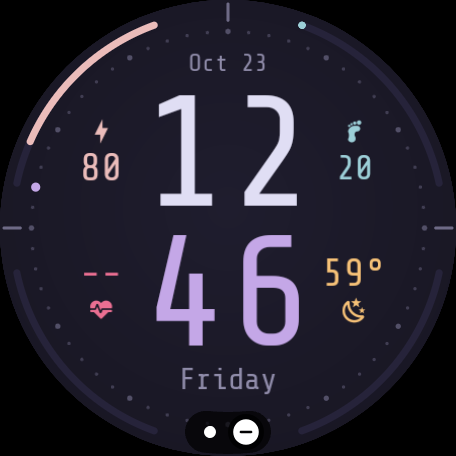
- Stacked hours over minutes in Shure Tech Mono, hours in
text, minutes iniris - Four bezel gauges, each matching the metric beside it:
battery (
rose), steps toward 10k (foam), heart rate 40 to 180 bpm (love), chance of rain (gold) - Weather icon for the current condition, with night variants for clear and partly cloudy
- Minute track with a stepping seconds dot
- Always-on mode drops the background, gauges and icons to black and dims the rest
Build
Needs the Android SDK (build-tools 34, platform 34) and uv.
./build.sh                         # build/rosepine-watchface.apk, signed with the debug key
./build.sh 192.168.1.50:5555       # build and install over adb
Set it as the active face from the watch's face picker, or over adb:
adb shell am broadcast -a com.google.android.wearable.app.DEBUG_SURFACE \
--es operation set-watchface --es watchFaceId us.lastra.rosepine.watchfaceLayout
res/raw/watchface.xml is generated. Edit extras/gen_face.py instead; build.sh runs it
on every build. The generator holds the palette, the gauge geometry and the vertical
layout (TIME_Y moves everything at once). It also reads the bundled font and shifts each
Nerd Font icon so its outline, not its cell, is centered, since the runtime centers by
advance width.
extras/prep_fonts.py subsets the fonts in res/font to ASCII, the degree sign and the
icons the face uses. It also builds the other font sets that were tried during design.
extras/wallpaper.py renders a matching phone wallpaper.
License
Code is MIT. The bundled font subsets are Shure Tech Mono Nerd Font, derived from Share
Tech Mono by Carrois Type Design, under the SIL Open Font License (LICENSE-fonts.txt).
Icons come from Material Design Icons via Nerd Fonts.